BSL Power---POWER PRODUCTS SUPPLIER

What Impacts Charger Charging Efficiency? Key Factors & Optimization Tips
We’ve all been there: you plug in your smartphone or laptop, expecting a fast charge before heading out, only to find it’s barely gained 10% after 30 minutes. The culprit often boils down to charging efficiency—a critical metric that determines how much of the electrical energy from the wall is actually converted into usable power for your device’s battery. It’s not just about speed; low efficiency wastes energy, generates excess heat, and can even shorten your battery’s lifespan. In this technical deep dive, we’ll break down the key factors that influence charger efficiency and share practical tips to get the most out of your charging setup.
12/5/20255 min read
What Impacts Charger Charging Efficiency? Key Factors & Optimization Tips
We’ve all been there: you plug in your smartphone or laptop, expecting a fast charge before heading out, only to find it’s barely gained 10% after 30 minutes. The culprit often boils down to charging efficiency—a critical metric that determines how much of the electrical energy from the wall is actually converted into usable power for your device’s battery. It’s not just about speed; low efficiency wastes energy, generates excess heat, and can even shorten your battery’s lifespan. In this technical deep dive, we’ll break down the key factors that influence charger efficiency and share practical tips to get the most out of your charging setup.
1. Understanding Charging Efficiency: The Basics
Charging efficiency is defined as the ratio of electrical energy stored in the battery to the electrical energy drawn from the power grid, expressed as a percentage. A “perfect” charger would have 100% efficiency, but in reality, energy is lost as heat, electromagnetic radiation, and through internal resistance—most consumer chargers today operate between 70% and 95% efficiency, depending on the scenario.
This efficiency isn’t constant: it fluctuates based on the charger’s design, the device’s battery state, and even the cable you use. Let’s unpack the technical factors that drive these fluctuations.
2. Core Technical Factors Impacting Charging Efficiency
a. Charger Design: Power Conversion Topology
The heart of any charger is its power conversion circuit, which converts the AC power from your wall outlet to the DC power your device’s battery needs. The topology (design) of this circuit is the single biggest factor in efficiency:
Linear Chargers (Low Efficiency): Older, budget-friendly chargers often use linear regulators. These work by “bleeding off” excess voltage as heat—great for simplicity, but terrible for efficiency. A linear charger powering a 5V device from a 12V input might only hit 40-60% efficiency, with most energy wasted as warmth.
Switch-Mode Power Supplies (SMPS) (High Efficiency): Modern chargers rely on SMPS topology, which uses semiconductor switches (MOSFETs) to rapidly turn power on and off, reducing energy loss. Within SMPS, sub-designs like Flyback (common in phone chargers) and Forward (used in laptop chargers) further boost efficiency. High-quality SMPS chargers can reach 85-95% efficiency, especially when operating at their optimal power load.
Component quality also matters here: low-grade capacitors or MOSFETs with high on-resistance will increase energy loss, dragging down efficiency even in a well-designed SMPS circuit.
b. Power Matching: Charger Output vs. Device Demand
Chargers and devices communicate via protocols like USB Power Delivery (PD), Quick Charge (QC), or Apple’s MagSafe to negotiate the optimal voltage and current. When this “negotiation” is mismatched, efficiency plummets:
Oversized Chargers: Using a 100W laptop charger for a 15W smartphone forces the charger to operate at a fraction of its rated capacity. SMPS chargers are most efficient at 50-100% of their maximum load; running them at 10-20% load can drop efficiency by 10-20%.
Undersized Chargers: A 20W charger powering a 45W laptop will work, but it will run at full capacity continuously, generating more heat and reducing long-term efficiency. The laptop’s battery may also charge slower as the device prioritizes power for active use over charging.
This is why “smart” charging protocols are so important—they ensure the charger delivers exactly what the device needs, not more or less.
c. Battery State and Chemistry
Your device’s battery isn’t a passive recipient of power; its state and chemistry directly affect how efficiently it absorbs energy:
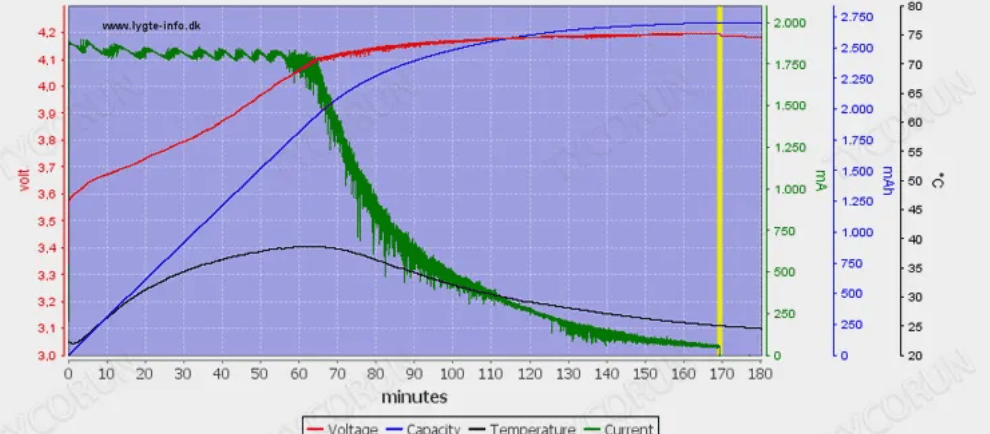
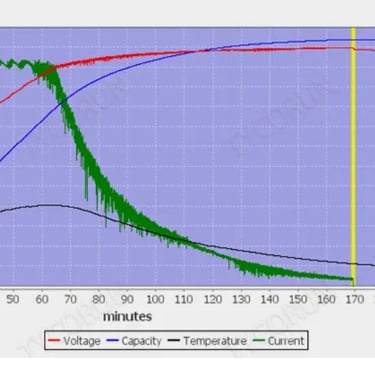
State of Charge (SOC): Lithium-ion (Li-ion) batteries—used in most smartphones, laptops, and tablets—charge in three phases: bulk, absorption, and trickle. Efficiency is highest during the bulk phase (20-80% SOC), where the battery accepts maximum current. As it nears full charge (80-100% SOC), the charger reduces current to prevent overcharging, and efficiency drops by 5-15%.
Battery Temperature: Li-ion batteries thrive between 20°C and 30°C (68°F and 86°F). Below 10°C (50°F), the battery’s internal resistance spikes, so less energy is stored and more is lost as heat. Above 45°C (113°F), the charger may throttle current to protect the battery, also lowering efficiency. Extreme temperatures (below 0°C or above 60°C) can damage the battery and render charging nearly inefficient.
Battery Aging: Over time, Li-ion batteries develop internal resistance due to electrode degradation. An aging battery (with 70-80% capacity remaining) will have 20-30% higher internal resistance than a new one, leading to more energy loss and slower, less efficient charging.
d. Charging Cable Quality and Length
Cables are often overlooked, but they’re a critical part of the charging circuit. Their resistance determines how much voltage drops between the charger and the device:
Wire Gauge: Thicker cables (lower gauge numbers, e.g., 20AWG vs. 24AWG) have less resistance. A thin cable used for high-current charging (e.g., 6A for fast PD charging) can cause a 0.5-1V voltage drop, forcing the charger to work harder and waste energy.
Connector Quality: Loose or corroded USB-C/Lightning connectors increase contact resistance. Even a small amount of corrosion can add 0.1-0.2 ohms of resistance, leading to measurable efficiency loss.
Cable Length: Longer cables have more resistance. A 2-meter cable may have 30-50% more resistance than a 1-meter cable of the same gauge, making it a poor choice for fast, efficient charging.
e. Ambient Conditions and Heat Dissipation
Heat is the enemy of efficiency. Chargers generate heat during conversion, and if that heat can’t escape, the circuit’s components (like MOSFETs and transformers) will operate less efficiently:
Ambient Temperature: Charging in a hot room (above 35°C/95°F) or in direct sunlight traps heat, causing the charger’s internal temperature to rise. Most SMPS chargers start to lose efficiency when their internal temperature exceeds 40°C (104°F).
Heat Dissipation Design: High-efficiency chargers use heat sinks, vent holes, or metal casings to dissipate heat. Cheap chargers often skip these features, leading to overheating and reduced efficiency.
3. How to Boost Charging Efficiency: Practical Tips
Now that you understand the factors, here’s how to optimize your charging setup for maximum efficiency:
Match the Charger to the Device: Use the charger that came with your device, or a third-party charger that supports the same fast-charging protocol (e.g., 20W PD for iPhones, 65W PD for thin-and-light laptops).
Choose High-Quality Cables: Opt for certified cables (e.g., USB-IF certified for USB-C) with thick gauges (20AWG or lower) and tight-fitting connectors. Avoid cheap, unbranded cables.
Charge in Optimal Temperatures: Keep your device and charger away from direct sunlight, radiators, or enclosed spaces (like a backpack). If your device gets hot while charging, pause charging and let it cool down.
Charge Between 20-80%: To maximize both efficiency and battery lifespan, avoid letting your battery drop below 20% or charge above 80% regularly. Most devices have a “battery optimization” setting that does this automatically.
Replace Aging Components: If your charger gets unusually hot or your battery charges slowly, replace the charger or battery (if user-replaceable). An aging battery or faulty charger is a major efficiency killer.
4. The Future of Efficient Charging
Industry trends are pushing for even higher efficiency. New technologies like GaN (Gallium Nitride) chargers replace traditional silicon components with GaN semiconductors, which have lower resistance and generate less heat—GaN chargers can reach 95%+ efficiency and are smaller than equivalent silicon chargers. Wireless charging, long criticized for low efficiency (50-70%), is also improving with Qi2 and MagSafe 2 protocols, which reduce energy loss via better coil alignment and power management.
Final Thoughts
Charging efficiency isn’t just a technical buzzword—it directly impacts your daily life, your energy bills, and the lifespan of your devices. By understanding how charger design, power matching, battery state, and cables influence efficiency, you can make smarter choices to get faster, more efficient charges. Whether you’re upgrading to a GaN charger or simply swapping out a cheap cable, small changes can lead to big improvements.
Have questions about your specific charging setup? Drop a comment below, and we’ll help you optimize it!